Business programme
Start-Up, Scale-Up by Lloyds Bank Academy
Learn for yourself
Money, digital, career skills
Learn for business
To help start up and grow
Start-Up, Scale-Up by Lloyds Bank Academy
Know how to shop online safely.
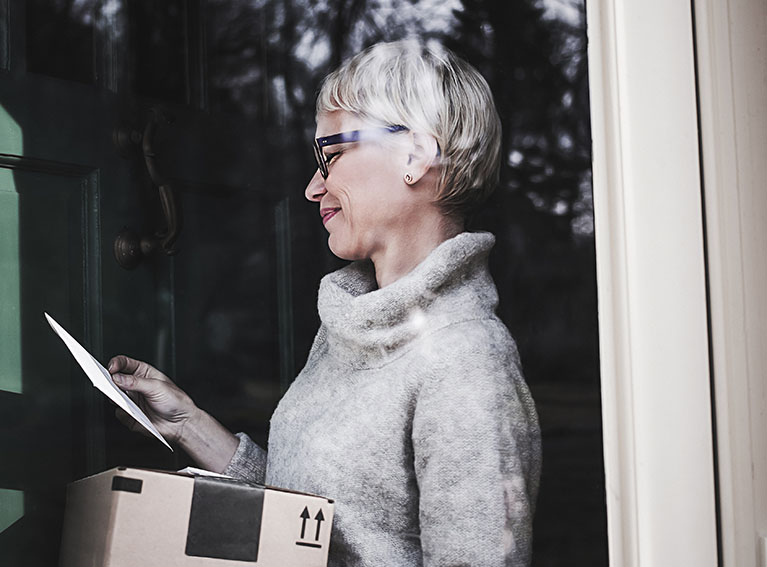
There are lots of reasons why people shop online. It may be the convenience of having their groceries delivered to their door. Or being able to shop at any time of day – even when the shops are shut. Plus, there are so many online shops that you can reach with just a few clicks or taps. So you’re likely to find whatever you’re looking for.
In this lesson, we’ll talk you through how to shop online safely. We'll also cover delivery options and how to save money while you shop.
15 minutes
Chapter 1
1 minute
A recent survey shows some reasons why people in the UK prefer to shop online rather than in store:
57%
Find it more convenient.
Almost half
Say it's quicker.
4 in 10
Can see a wider range of items.
Online shopping can make a really good addition to the way you do your shopping. For example, you might not have time to do your grocery shop in person. Maybe you don’t have a car to transport heavy bags back home. Shopping online can be a simpler way to get groceries delivered to your home.
But it’s more than just your weekly food shop. You can also shop for:
Clothes
From new trainers to school uniforms.
Household items
Like bedding, furniture or a new fridge.
Gifts
Flowers, cake or beer, delivered straight to their door.
Second-hand goods
Some sites and charities focus on pre-loved items.
Services
Book hair appointments, food delivery and holidays.
Goods from local shops
Some also have their own website for you to order online.
Chapter 2
7 minutes
Just like shops on your high street, no two online shops will look the same. Each website has their own design and way to buy, but the overall process is the same.
Follow these steps to help you reach an online shop, find what you want and check out safely.
If you know which shop you want to buy from, go directly to their website. Type in the website name or search for the shop name using your search engine.
Don’t know which shop you want to buy from? You can search for an item or for ideas. Like ‘red t-shirts’ or ‘21st birthday gift’.
You can also shop using apps on your phone or tablet. Some shops give you special deals and offers through their app, too.
To find and use a shopping app:
Step 1
Go to your app store
Use the App Store on Apple devices or Google Play on Android devices.
Step 2
Enter the shop name
You’ll see some results – look for the one that best matches the store name and logo.
Step 3
Download the app
Once you’re confident that it’s the right app, you can tap the ‘download’ or ‘install’ button.
Step 4
Open the app to start shopping
Depending on the app, you may need to register or sign in first.

Once you're on the site, you can search for what you’re looking for in two ways.
First, you can use the website’s search bar. This works a bit like a search engine, but it will only show you results on the website you’re on.
Your other option is to use the website’s menu to find what you need. Websites try and make it easy for you to find what you’re looking for. You should be able to find a list of items that match your search if it’s something they sell.
To find the menu, look for the symbol with three lines.
Once you’ve found the items you want to buy, you can add them to your ‘basket’. Some shops call this a ‘cart’ or ‘trolley. Just like in a real shop, your online basket is a place to hold your items until you buy them.
On the item screen, you’ll see an ‘Add to basket’ button. To add the item, just select this button.

There may be a ‘view basket’ option on the screen, or a symbol that looks like a trolley or basket. Select this to see what’s in your basket.
You can see what’s in your basket at any time during your shop. Plus, it’s what you do just before you check out. This is when you can check you’ve got the right items and the right quantity. If you’ve changed your mind about an item or how many you need, you’ll be able make remove items or change the quantity here.
Always check the items in your basket before you buy.
When you’re happy with what’s in your basket, head to the checkout. Look for a ‘Checkout’ button.
When you select this button, you may see different options:
Log into your account
If you’ve already got an account with the shop, you’ll need to log in. You won’t have to enter your details again if you agreed to save them when you set up your account.
Some shops need you to set up an account to shop with them. Expect to do this with supermarket sites and apps.
Sign up for an account
If it’s your first time on the site and you want to create an account, you’ll need to register. The site will ask you to enter a few of your details like your name, email, address and billing information. You’ll also set a password for your account. Make sure this password is a strong one.
Find out how to pick a strong password in our lesson, ‘Ten tips for staying safe’.
Check out as a guest
If you don’t want to or need to set up an account, you can always check out as a ‘guest’. In this case, you’ll only have to enter the personal details needed to take payment and deliver your products.
The company will likely need fewer personal details and won’t save them. So, if you come back to shop again, you’ll have to enter them a second time.
Registering for an account and logging in can help speed up checkout every time you buy from the same shop.
The shop may also email you with offers if you register and agree to hear about promotions.
Many shops offer a choice of delivery options. Others may give you just one. Either way, they’ll give you the details. This could include the delivery date or the number of days it will take to get your item to you.
Types of delivery:
Standard delivery
This usually takes 3-5 working days, depending on the shop.
It’s usually the cheapest option and may be free if you spend over a certain amount.
Next-day delivery
If you order before the cut-off time, some shops will send your parcel so it arrives the next day.
You usually have to pay extra for this.
'Named day' delivery
This gives you even more choice about when you receive your goods.
Some sites (like flower and gift delivery sites) let you pick the day you want your parcel to arrive, for an extra charge.
Pick up from local store/collection point
Some shops let you pick up your items from a nearby collection point, local shop or newsagent.
This can be helpful if you know you’re not going to be at home when the parcel arrives.

Just like delivery options, you may get a choice of how you pay. For instance, by debit or credit card, payment systems like PayPal or Apple Pay, or in instalments through Buy Now, Pay Later services.
You can find out more about each of these in our Make payments online lesson. We also have one specially on Buy Now, Pay Later.
Genuine shops and sellers will never ask for your PIN number or get you to pay through a bank transfer. Be wary of any that ask you to do this.
The most you should ever enter is your card number and the 3-digit security number on the back of your card. You’ll also need to enter the start and end/expiry dates of your card.
Once you’ve done these last few steps, you’re ready to complete your order. Always check the details on the last screen to make sure it’s all correct. Once you’re happy, you can check out. This may be a ‘Pay now’ or ‘Complete your order’ button.
Your payment will go through straight away, and you’ll receive an email receipt.
Paid by card?
You may be asked to verify the payment.
This could be a text code from your bank to type in, or a ‘confirm’ button on your mobile banking app.
Using PayPal or another payment service?
You may be redirected to their app or webpage to complete your payment.
Once you’ve confirmed, it will take you back to the shopping site.
Try again - that's not quite right!
It's easy to add things to your basket by mistake, for example, adding two items when you only want one. Remember, retailers will never ask for your pin.
That's right!
When online shopping we can easily add more items to our basket than we want or need, or forget to add something. To avoid any costly mistakes, always check before you pay.
Chapter 3
2 minutes
As we’ve seen, there are lots of delivery and collection options when you shop online. You can pay more for faster deliveries. Plus, some shops offer free delivery once you’ve spent over a set amount.
The seller will usually decide which delivery company they’ll use to send your parcel. They may have their own drivers and vans. Once you’ve ordered, they’ll send you details about your delivery, like a tracking number or a link to check where your parcel is.
These can be helpful to work out exactly when your parcel will arrive. Many delivery companies have their own websites or apps for you to track your goods.
Go to the company’s website or app
You may need to search for the site or download the app first.
Enter the tracking number
You’ll find this in the email that confirmed your order.
Check the details
You’ll see where the parcel is coming from, and when it’s likely to arrive.
Sometimes you can’t control when a parcel is due to arrive. If you’re going to be out, you can tell the delivery company what to do with your item. For example, deliver the next day, leave with a neighbour, leave in a safe place or pick up from a local collection point.
Supermarket deliveries work on a timeslot basis. You’ll get the chance to book a slot that suits you, before you start shopping.
You may find that some slots cost more than others – like in the evening and at weekends, which lots of people want.
Picking a different time could work out cheaper. Plus, some supermarkets let you buy a ‘delivery pass’ which gives you unlimited deliveries for a whole year.
Just like when you shop in person, things aren't always right first time.
When you get something home, it’s not always as you expect. Maybe it’s the wrong size? The wrong product? Or just not what you wanted.
Online, all sellers usually provide a ‘cooling off’ period. This is where you can return your items, no questions asked. After this, you should still be able to return you items if they’re faulty.

Once you’ve decided to return your item, start by looking at your email confirmation or the seller’s website. You’re likely to find the returns details here. Every seller will have a different returns policy, so it’s best to double-check their website.
Generally, the seller will give you a return address to send the parcel to. They’ll then refund either the item, or the item and postage.
Chapter 4
2 minutes
With a whole world of products at your fingertips, it can be tempting to buy everything you see online.
Here are some ways to save money on goods and keep yourself on budget.
Just like when you go to a shop in person, having a list can help you get only what you need.
Without a list, you may end up buying other items in the shop, which can be expensive. You can write this down or use a list app or website.
Some online shops have an area where you can find lists of your favourite items, or those you’ve bought before.
There are lots of websites and apps that can help you compare the prices of items in different shops. Just enter what you’re looking for and they’ll show you what the price is, across different sites and shops.
Want to learn more about these sites and how they can help you save money? Check out our Comparison sites lesson.
There are lots of websites offering coupons and voucher codes to help you save money on goods online.
The MoneySavingExpert site has a whole section on deals, vouchers and shopping plus separate pages on vouchers and top sales.
Other sites include Voucher Codes, My Voucher Codes and Voucher Cloud.
If you register on a website or sign up for a mailing list, you may get exclusive access to deals on some shops. Some supermarkets and other retailers also have loyalty schemes, with lower prices for members.
Be aware that this means the store saves your details and can send you emails. Don’t want all these emails? You can ‘unsubscribe’ or block these emails at any time.
Chapter 5
3 minutes
Take care when shopping online. Just like shopping in person, there are always criminals who want to take your money. They just act in different ways online.
Here are some tips to help you stay safe when you shop online.
It’s important to know that the shopping sites and apps you use are secure. If you can, only visit the websites of sellers you trust. If you’re using an app, make sure you download it from your official app store – like Google Play or Apple’s App Store.
Look carefully at the website to make sure it seems real – not a copy set up by scammers. Check the web address or ‘URL’ at the top of the screen – it should start ‘https’ and clearly show the shop name.
One benefit of using an app is there's less chance of fake apps than fake websites. Just make sure you only use your device’s official app store to download these apps.
Always check that the app you download is the right one, too. You can do this by looking at the name and the logo.
When you pay online by credit or debit card, you’re trusting the shopping site with your card details. That’s one more reason to check the site is genuine and not a fake. Your bank may want to do extra checks to keep you and your money safe. That’s why you may get a text code or a prompt to confirm with your banking app.
Paying through digital wallets or payment services like Apple Pay, Google Pay or PayPal? These can be both convenient and secure. You’re not having to give your card details to each online shop. Instead, the card service stores these details safely and asks you to log in or confirm your identity before it makes the payment.
Some ways to pay may give extra protection, too. For example, Chargeback for card payments and Section 75 for credit card purchases over £100. These may help you claim your money back if the goods are faulty or don’t turn up at all. Some payment services give you similar protection.
Be wary of shops asking you to pay through a bank transfer and never give them your PIN number.
Stay safe - use a different store or seller instead.
Online criminals can make fake versions of these emails to trick you into following a link. They can use this link to get access to your device or take you to a fake website. Once you reach that fake website, their aim is to get you to enter your personal details.
Avoid this by downloading the delivery company's app or using a search engine to find their website. This means you can make sure you’re talking to the right company.
When you view your delivery details, it should show details about what’s in your order, or at least who it’s from. If it doesn’t, the message was likely a fake designed to steal your money or details.
We want to make sure you feel confident to spot any risks and know what to do.
Before you shop online, we recommend you take our ‘Ten tips for staying safe’ lesson.
Lloyds Bank Academy is committed to providing information in a way that is accessible and useful for our users. This information, however, is not in any way intended to amount to authority or advice on which reliance should be placed. You should seek professional advice as appropriate and required. Any sites, products or services named in this module are just examples of what's available. Lloyds Bank does not endorse the services they provide. The information in this module was last updated on 24th February 2026.